
Smart Water Leak Detectors for Everyday Homes
A smart water leak detector is designed to detect water near a sensor and may help you notice water sooner through a local alarm, app notification, email, or connected smart home system.
Written by Brian Reinke for AI Home Automation Hub
Last updated: June 2026
Smart leak detectors: what they are, where they go, and what to check
What are smart leak detectors?
They are sensors designed to detect water at their contacts or sensing cable. Depending on the product, they can sound a local alarm or send alerts through an app, email, or smart home system.
Where are they used?
Common locations include under sinks, beside washing machines and dishwashers, near water heaters, around sump areas, in utility rooms, and in basements.
What should beginners check?
Check compatibility before buying, including local versus phone alerts, app and account requirements, hub or WiFi needs, sensor count, battery type, subscriptions, placement limits, and installation difficulty.
WiFi, gateways, Amazon Sidewalk, Zigbee, Matter, apps, accounts, and smart home controllers can add useful features—and more setup steps.
Platform support varies by feature
A product may connect to Alexa, Google Home, Apple Home, Matter, SmartThings, or Home Assistant without supporting every alert or automation you expect.
Subscriptions need a separate check
Basic sensing may work without a paid plan while calls, monitoring, extended services, or third-party automations may have separate terms.
Shutoff systems require more planning
A main-line smart shutoff valve needs the correct pipe size, installation location, nearby power, reliable WiFi, and careful plumbing review.
Important: A water leak sensor or smart shutoff device is an added monitoring tool. It does not replace plumbing maintenance, regular inspection, prompt investigation, or professional help. No device can guarantee that an alert or shutoff action will occur in every situation.
How we chose these products
We compared the listed products using manufacturer product pages, official manuals, support documentation, setup requirements, and published smart home compatibility information. Product details were last reviewed on June 15, 2026.
Alerts and connectivity
We compared alert type, app or local alarm behavior, hub and WiFi requirements, and supported smart home compatibility.
Installation and ownership
We reviewed installation complexity, battery and placement needs, subscription concerns, and whether the setup appears practical for renters.
Product type and buyer fit
We identified whether each product is a sensor kit, standalone local alarm, ecosystem-specific sensor, or whole-home shutoff option, then matched it to likely buyer needs.
Types of water leak detectors and alert systems
Most options fall into four practical categories. Understanding the category makes it easier to compare products with very different features.
Standalone water alarms
These battery-powered alarms sound when sensing contacts detect water. They do not need WiFi, an app, or a smart home platform, but they cannot send remote alerts.
WiFi or gateway leak sensors
Connected sensors can send alerts through a supported app or email service. Some connect through a powered gateway instead of connecting directly to WiFi.
Smart home ecosystem sensors
These devices may work with systems such as Ring, Alexa, Google Home, Matter, SmartThings, or Home Assistant. The exact controller and supported capability can vary.
Whole-home smart shutoff valves
These systems monitor a compatible main water line and may support remote, automatic, or manual shutoff functions. Installation is more involved than placing a battery sensor.
How to choose a smart water leak detector
Start with your alert needs and installation limits, then compare ecosystems and added features.
-
Count the locations you want to monitor
Common placements include under sinks, beside washing machines and dishwashers, near water heaters, around sump areas, and in basements. A single sensor cannot monitor several separated locations.
-
Decide whether you need remote alerts
If you only need a nearby sound, a standalone alarm may be enough. If you want a notification when away from home, check app, email, gateway, internet, and phone requirements.
-
Check the connection method
Confirm whether the device uses direct WiFi, a proprietary gateway, Amazon Sidewalk, Zigbee, Matter, Bluetooth, or another connection path.
-
Verify smart home compatibility
Look for the exact feature you need—not only a platform logo. A sensor may expose water status but not support the routine, announcement, or notification behavior you expect.
-
Review power, installation, and ongoing terms
Check battery type, powered-hub placement, outlet distance, pipe size, installation restrictions, app support, and subscription details before ordering.
Smart leak detection options for different homes
The products below are organized by practical fit. Each card explains the alert method, compatibility, setup difficulty, and the main issue to check before buying.
Simple WiFi kit to compare
GoveeLife uses battery sensors with a powered gateway and supported app or email alerts.
Hub-based multi-sensor kits to compare
The two YoLink kits cover several locations; Sensor 4 adds built-in sounders while Sensor 1 does not.
Smart shutoff option to research carefully
Moen Flo adds main-line monitoring and shutoff functions but requires plumbing, power, WiFi, and installation checks.
Simple local alarm option
Zircon Leak Alert works without an app, hub, WiFi, or smart home account, but it cannot send remote notifications.
Ring ecosystem option
Ring Flood & Freeze Sensor may fit Ring households that are comfortable using Amazon Sidewalk.
Matter and platform-flexible option
Shelly Flood Gen4 offers several connectivity paths, with setup depending on the selected platform and controller.
iPhone-focused kit to compare
Zircon Leak Alert 360 combines rechargeable sensors, a charging hub, and supported iOS alerts; verify current package and plan details.
Connected leak detector kits for beginners and iPhone users
These options focus on alerts beyond a local sound. Check the included hub, supported phone platform, WiFi requirements, notification settings, and service terms.
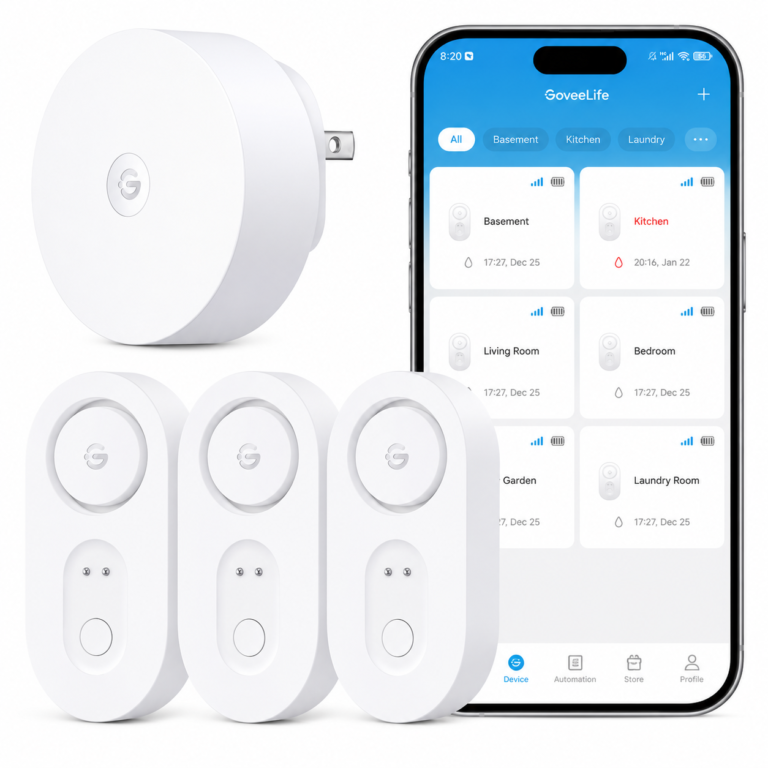
GoveeLife Upgraded Smart Water Leak Detector 1s
The GoveeLife H5044 gateway and H5059 sensor system is designed for placing battery sensors near several water-prone areas. It may help you notice water sooner through supported local, app, or email alerts.
- Watch out for: The gateway is required for smart functions. Confirm the current kit contents, subscription status, notification behavior, and platform compatibility before buying.
As an Amazon Associate I earn from qualifying purchases.
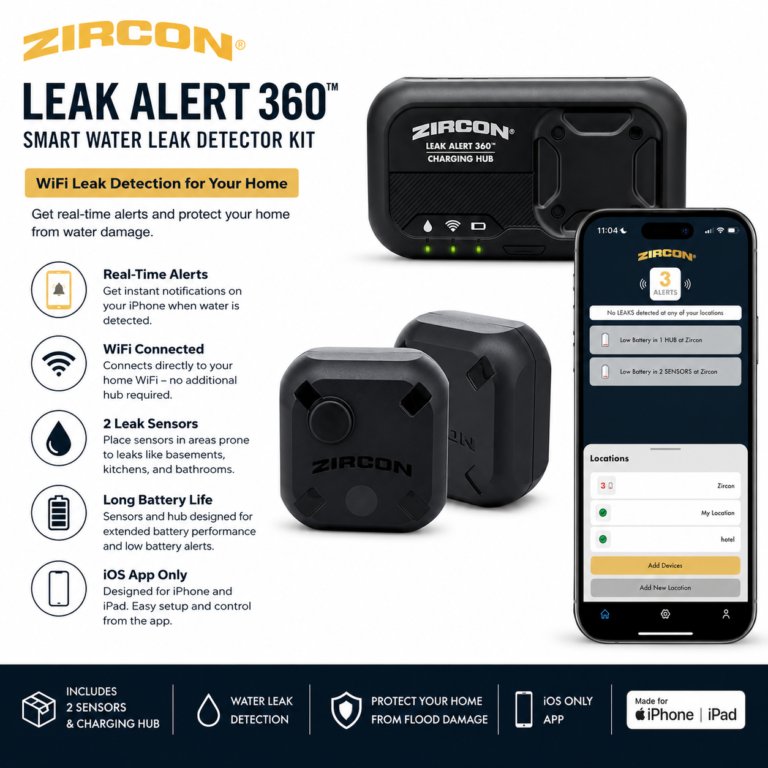
Zircon Leak Alert 360 Smart Water Leak Detector Kit
The Zircon Leak Alert 360 system uses rechargeable sensors and a charging hub with supported app, email, audible, and visual alerts. It may fit iPhone users who want several notification methods.
- Watch out for: Confirm the exact retail package, sensor count, wireless requirements, current phone support, and monitoring-plan terms before buying.
As an Amazon Associate I earn from qualifying purchases.
Hub-based water leak sensor kits
Hub-based systems can support several sensor locations without requiring every sensor to connect directly to WiFi. The hub and internet connection are still important for remote functions.
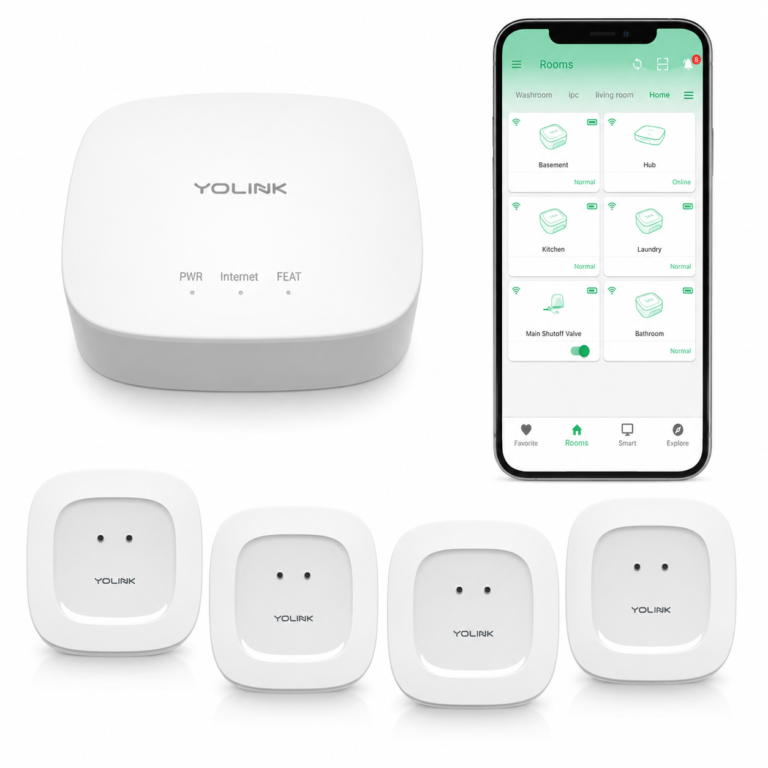
YoLink Water Leak Starter Kit: Hub + 4 Leak Sensor 1
The YoLink Sensor 1 starter kit uses puck-style detectors with top and bottom sensing contacts. It may fit homes that need sensors in several indoor locations without a siren built into each sensor.
- Watch out for: The YoLink hub is required for full functionality. Sensor 1 does not have a local audible siren. Confirm exact kit contents and any third-party service costs.
As an Amazon Associate I earn from qualifying purchases.
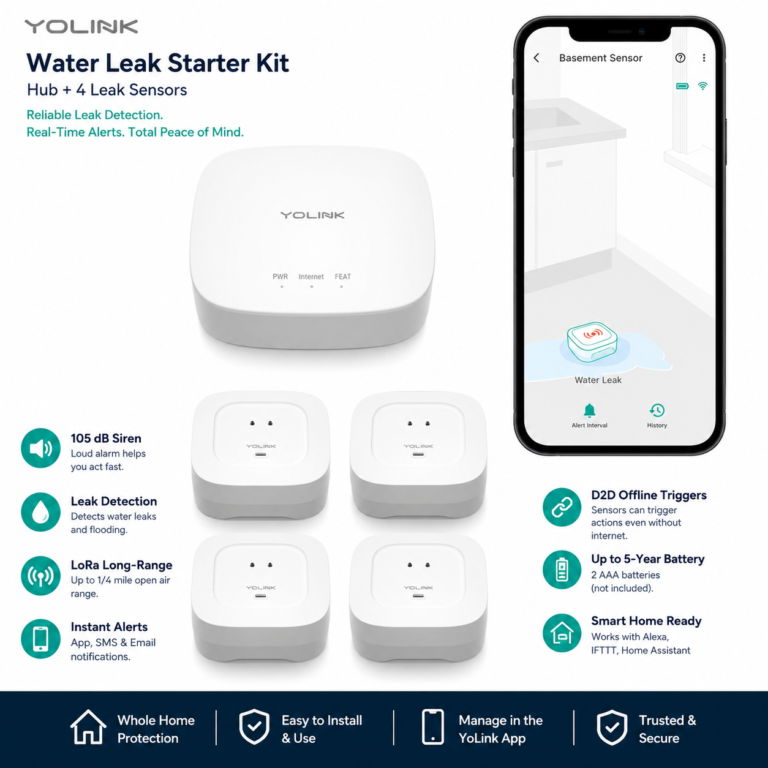
YoLink Water Leak Starter Kit: Hub + 4 Leak Sensor 4
The YoLink Sensor 4 starter kit adds built-in sensor sounders and low-temperature sensing to a hub-based multi-sensor setup. It may fit people who want connected alerts plus a local sound at each sensor.
- Watch out for: The YoLink hub is required for full functionality. Confirm exact package contents, integration support, notification settings, and any third-party service costs.
As an Amazon Associate I earn from qualifying purchases.
Ring and Matter water leak sensor options
These products may fit homes already using a particular ecosystem. Verify the exact supported capability, controller, connection method, and subscription requirement.
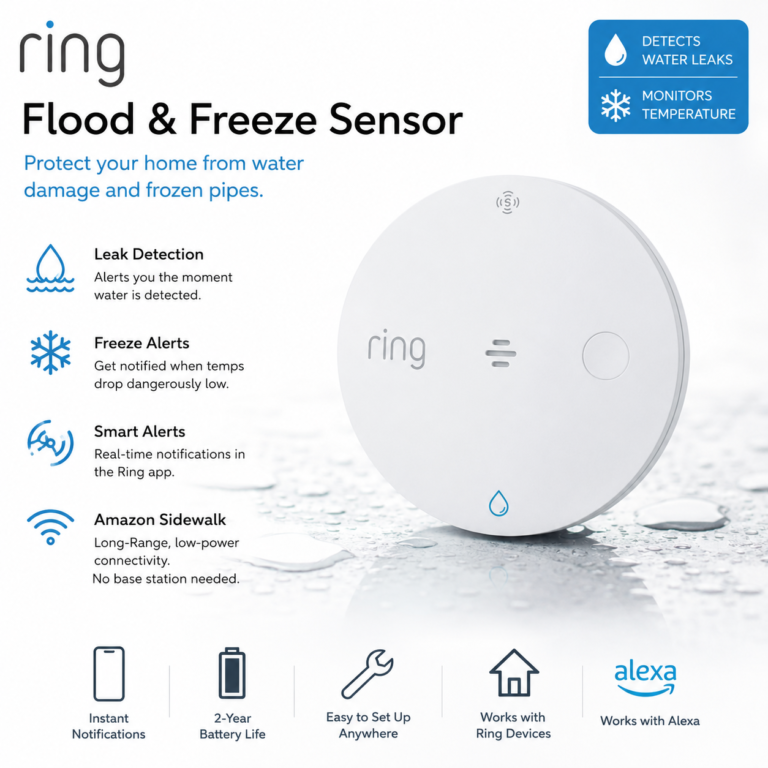
Ring Sensors: Flood & Freeze Sensor
The Ring Flood & Freeze Sensor 2nd Gen is a battery sensor designed to notice water or low-temperature conditions through Amazon Sidewalk connectivity. It may fit an existing Ring household that accepts Sidewalk.
- Watch out for: Amazon Sidewalk is required. Automated call features may require a compatible Ring subscription. Confirm alert behavior, coverage, and current plan terms before buying.
As an Amazon Associate I earn from qualifying purchases.
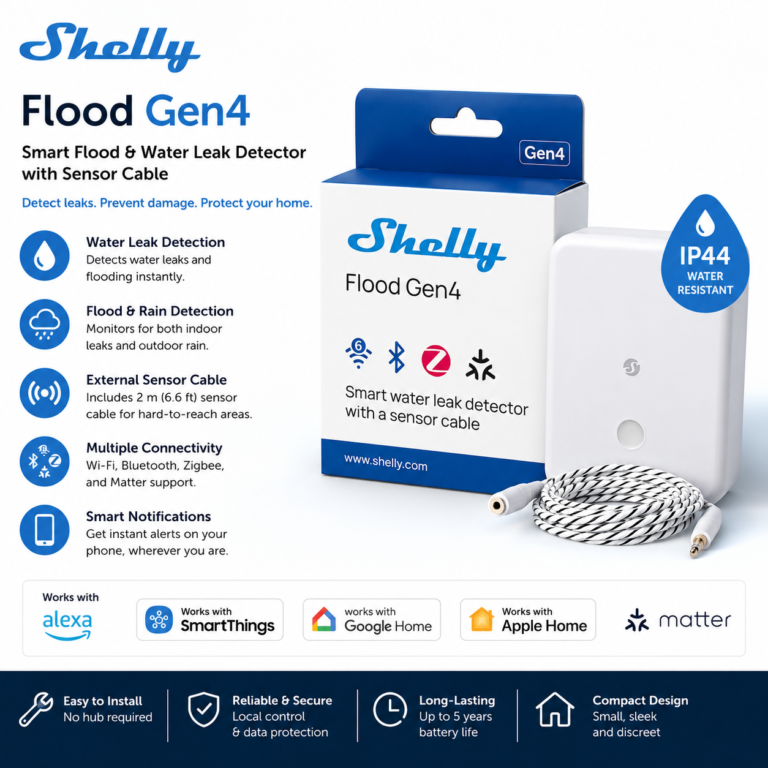
Shelly Flood Gen4
Shelly Flood Gen4 is a battery-powered sensor with an extendable sensing cable, built-in buzzer, and several connectivity paths. It may fit experienced smart home users who want broader integration options.
- Watch out for: Behavior depends on the setup path and may require a Matter controller, Zigbee hub, or specific platform configuration. Confirm each capability before buying.
As an Amazon Associate I earn from qualifying purchases.
Smart water monitoring with shutoff functions
A main-line smart shutoff valve is different from a small floor sensor. It requires plumbing compatibility, nearby power, reliable WiFi, app setup, and careful installation planning.

Moen Flo 3/4-inch Smart Water Shutoff Valve
The Moen Flo 3/4-inch Smart Water Shutoff Valve can support main-line water monitoring and remote, automatic, or manual shutoff functions when correctly installed and supported.
- AI feature: App-connected water monitoring with supported remote, automatic, and manual shutoff controls.
- Works with: Moen app, 2.4 GHz WiFi, Alexa, Google Assistant, IFTTT, and Control4 as supported.
- Setup: Advanced: verify the 3/4-inch plumbing fit, installation location, nearby outlet, WiFi coverage, app requirements, and professional installation needs.
- Watch out for: This is not a renter-friendly default. Confirm pipe compatibility, installation restrictions, outlet distance, WiFi reliability, and FloProtect plan details before buying.
As an Amazon Associate I earn from qualifying purchases.
A simple standalone water alarm
A local alarm may be the right choice when simplicity matters more than remote notifications. It avoids app, account, gateway, WiFi, and smart home setup.
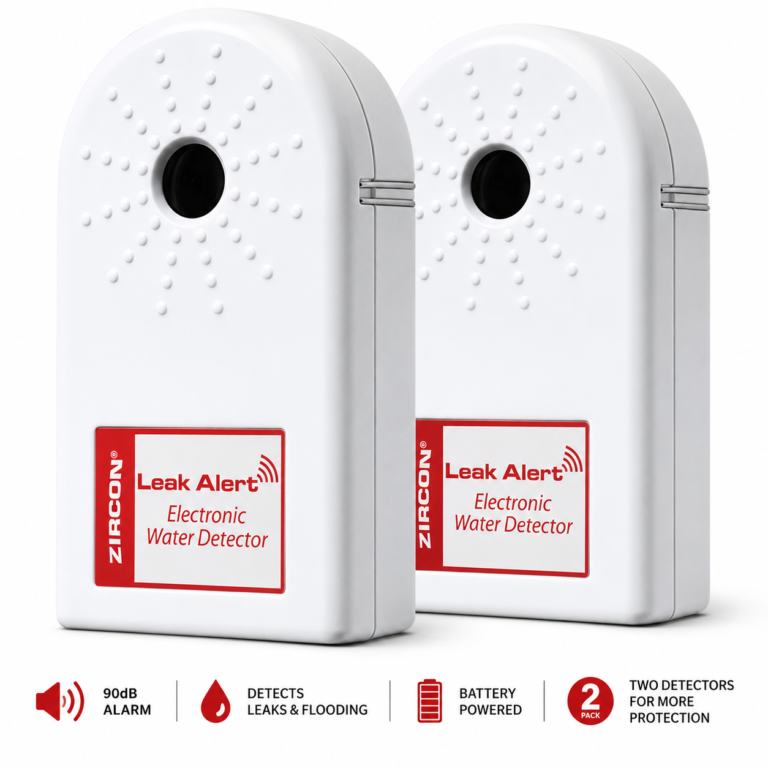
Zircon Leak Alert Water Leak Detector & Flood Sensor Alarm 2 Pack
The Zircon Leak Alert 2 Pack is a standalone battery-powered water alarm for nearby listening. It may fit renters or beginners who want basic detection without an app, hub, WiFi, or smart home platform.
- AI feature: No smart automation; water-sensing contacts trigger a local audible alarm.
- Works with: No smart home platform required.
- Setup: Easy: install the required 9V alkaline battery, position the sensing contacts correctly, and test the alarm.
- Watch out for: There are no app alerts or remote notifications, so someone must be close enough to hear it. Confirm the exact package and battery-inclusion details before buying.
As an Amazon Associate I earn from qualifying purchases.
Smart water leak detector comparison
Use this table to compare alert method, setup difficulty, and the most important compatibility question for each product.
| Product | Alert type | App or hub requirements | Best fit | Setup caution |
|---|---|---|---|---|
| GoveeLife Upgraded Smart Water Leak Detector 1s | Supported local, app, and email alerts | GoveeLife app, H5044 gateway, and 2.4 GHz WiFi | Beginners wanting connected sensors in several locations | Moderate; confirm kit contents, notification behavior, and subscription status |
| Zircon Leak Alert 360 Smart Water Leak Detector Kit | Supported app, email, audio, and visual alerts | Leak Alert 360 iOS app and powered charging hub | iPhone users wanting several alert methods | Moderate; verify sensor count, wireless requirements, phone support, and plan terms |
| YoLink Water Leak Starter Kit: Hub + 4 Leak Sensor 1 | Supported app alerts; no local siren in Sensor 1 | YoLink app and YoLink hub required for full functionality | Several indoor locations without a sounder in each sensor | Moderate; confirm kit contents, integrations, and third-party service terms |
| YoLink Water Leak Starter Kit: Hub + 4 Leak Sensor 4 | Local sounders, supported app alerts, and low-temperature sensing | YoLink app and YoLink hub required for full functionality | Several locations where local sensor sounders are useful | Moderate; confirm kit contents, integrations, and alert configuration |
| Ring Sensors: Flood & Freeze Sensor | Supported water and low-temperature alerts | Ring setup using Amazon Sidewalk; no Ring Alarm Base Station required | Existing Ring households comfortable with Amazon Sidewalk | Moderate; verify Sidewalk coverage, Alexa behavior, and subscription-dependent calls |
| Shelly Flood Gen4 | Local buzzer and supported remote or platform alerts | Shelly app or supported WiFi, Bluetooth, Zigbee, or Matter setup; a controller may be needed | Smart home users wanting Matter and multiple connection options | Moderate to advanced; verify the controller, hub, setup path, and exact platform behavior |
| Moen Flo 3/4-inch Smart Water Shutoff Valve | App alerts with remote, automatic, and manual shutoff functions | Moen app and 2.4 GHz WiFi; no separate hub confirmed | Homeowners considering main-line monitoring and shutoff functions | Advanced; verify pipe size, installation restrictions, nearby power, plumber needs, and plan details |
| Zircon Leak Alert Water Leak Detector & Flood Sensor Alarm 2 Pack | Standalone local audible alarm | No app, hub, WiFi, or smart home account required | People wanting a simple alarm without connected features | Easy; confirm hearing distance, placement, required battery, and exact package contents |
Where to place water leak sensors
Place a sensor where unwanted water is likely to reach its contacts or sensing cable early. Always follow the product instructions because sensing designs and placement requirements differ.
Kitchen and bathroom sinks
Place sensors on a stable surface under supply lines, drains, and shutoff valves without blocking access or exposing the device to routine splashes.
Washing machines and dishwashers
Choose a location near hoses or connections where the sensor can remain flat and accessible for testing and battery replacement.
Water heaters and utility areas
Position sensors according to manufacturer guidance and keep powered gateways, outlets, and electronics away from standing water.
Basements and sump areas
Check wireless range, signal obstacles, humidity limits, and whether a local sounder can be heard from the living area.
How to set up and test a smart leak detector
A successful setup includes more than adding the device to an app. Test every alert path that your household expects to use.
-
Choose sensor locations
List the sinks, appliances, utility areas, basement spots, and other water-prone locations you want to monitor, then choose sensor positions that follow the manufacturer instructions.
-
Check WiFi, hub, and app requirements
Confirm the supported connection method, WiFi frequency, gateway or controller needs, app compatibility, account requirements, and internet access.
-
Confirm phone alerts
Enable notification permissions, household sharing, email alerts, and supported smart home announcements that you expect to use.
-
Test each sensor
Follow the manufacturer instructions to test water sensing, local sounders, app notifications, email alerts, and supported automations at every sensor location.
-
Review battery requirements
Check the required battery type, whether batteries are included, how low-battery warnings appear, and how easily each sensor can be reached for replacement or charging.
-
Review subscriptions
Confirm which sensing and notification features work without a paid plan and whether calls, monitoring, or third-party services have ongoing terms.
-
Check sensors periodically
Review placement, sensing contacts, batteries, connectivity, app permissions, alert settings, and subscription terms on a regular schedule.
When a particular leak detector may be the wrong fit
Users who do not want app accounts or hubs
Choose a standalone local alarm instead of a connected sensor if you do not want an app account, gateway, smart home controller, or cloud-connected setup.
Homes with weak WiFi or unreliable connectivity
Remote alerts may depend on WiFi, a gateway, internet service, cloud services, and phone permissions. Check signal strength at each planned sensor or hub location.
People expecting a sensor to stop leaks by itself
A sensor is designed to detect water and may help you notice water sooner. A standard sensor does not repair plumbing or stop a leak by itself.
Renters considering a shutoff valve
A main-line shutoff option is not a renter-friendly default. Get property-owner approval and professional guidance before considering permanent plumbing work.
People who already need plumbing repairs
A detector is not a substitute for repairing a known plumbing problem. Contact a qualified professional when a fixture, pipe, valve, appliance connection, or drain needs attention.
Investigate every alert promptly
If a detector notices water or sounds an alarm, check the area and contact a qualified professional when appropriate.
Frequently Asked Questions
What is a smart water leak detector?
A smart water leak detector is a sensor designed to notice water near its sensing contacts or cable and provide a supported local or remote alert. Some models use an app, gateway, WiFi, Amazon Sidewalk, Zigbee, Matter, or another smart home connection.
Where should I place a water leak sensor?
Common locations include under sinks, beside washing machines and dishwashers, near water heaters, around sump areas, and in basements. Follow the product instructions and keep the sensing contacts or cable positioned correctly.
Do all smart leak detectors need WiFi?
No. Standalone alarms need no WiFi. Some connected sensors use a gateway, Amazon Sidewalk, Zigbee, Matter, Bluetooth, or another connection instead of direct WiFi.
Is a WiFi water leak detector better than a hub-based kit?
Neither is automatically better. Direct or simpler connections may use fewer devices, while a hub can support several sensors and different communication ranges. Choose based on placement, alert needs, and setup comfort.
Can a smart leak detector send an alert when I am away?
App or email alerts can reach you away from home when supported, but they may depend on device power, gateway status, internet service, cloud services, account access, and phone notification settings.
Do smart water leak detectors work with Alexa or Matter?
Some do, but supported capabilities vary. Confirm whether the product exposes water status, supports announcements or routines, and requires a compatible hub or Matter controller.
Do smart leak detectors require a subscription?
Some products provide basic sensing without a paid plan, while calls, monitoring, extended services, or third-party automations may have separate terms. Check current details before buying.
Are water leak sensors renter-friendly?
Battery sensors and standalone alarms may be renter-friendly when they require no wiring or plumbing changes. Renters should get permission before making permanent changes or considering a main-line shutoff valve.
Will a smart leak detector work when the internet is down?
Local alarm behavior may continue on some devices, but app notifications, email alerts, remote controls, and cloud features may not. Check the instructions for the exact model.
How often should I test a leak detector?
Follow the manufacturer testing and maintenance instructions. Also review battery status, placement, connectivity, app permissions, and alert settings regularly.
Can a smart leak detector prevent water damage?
No device can guarantee prevention. A detector may help you notice water sooner or send supported alerts, but it does not replace maintenance, inspection, prompt investigation, or professional help.
Verify the complete system before buying
Confirm the exact model and package contents, alert method, app and phone requirements, WiFi frequency, hub or controller needs, battery and outlet requirements, smart home compatibility, installation limits, and subscription terms. Choose the system that fits your home and setup comfort—not simply the one with the longest feature list.