Echo product pages can make a simple smart home decision feel strangely slippery. One device says Matter. Another says Thread. Another says Zigbee. Echo Hub sounds like a hub, Echo Show sounds like a screen, and Echo Dot sounds like it should control everything because it has Alexa.
The practical answer is this: an Echo can be a Matter controller, a Thread border router, a Zigbee hub, a smart display dashboard, or simply an Alexa speaker. Those are different jobs, and the exact model and generation matter.
Quick answer: which Echo devices work as smart home hubs?
Many Echo devices can help control a smart home, but only some Echo devices do the deeper hub jobs people usually mean when they say “smart home hub.”
For Matter, Amazon’s official Alexa Matter documentation lists many Echo models as Matter-enabled, including Echo, Echo Dot, Echo Dot Max, Echo Hub, Echo Pop, several Echo Show models, Echo Studio, and selected eero models. That means many Echo devices can act as Matter controllers for compatible Matter devices.
For Thread and Zigbee, the list is narrower. Amazon’s official Thread and Zigbee documentation lists these Echo models as having Thread border router support and/or Zigbee hub support: Echo (4th Gen), Echo Dot Max, Echo Hub, Echo Plus (2nd Gen), Echo Show 21, Echo Show 15 (2nd Gen), Echo Show 11, Echo Show 10 (3rd Gen), Echo Show 8 (3rd Gen and 2025 release), and Echo Studio (1st Gen and newer, including the 2025 release). Selected eero models also appear in Amazon’s official protocol lists.
If you only want voice control for Alexa-compatible Wi-Fi devices, your current Echo speaker may be enough. If you want to add Matter-over-Thread sensors, Zigbee bulbs, or a wall-style smart home control screen, the exact Echo model matters.
What “smart home hub” means on an Echo device
Amazon and retailers use “smart home hub” in a few different ways. For beginners, that can be maddening. The phrase can mean at least four different jobs.
Alexa voice controller
You say, “Alexa, turn on the kitchen lights,” and Alexa sends the command to a compatible device, app, skill, hub, or cloud service. A basic Echo speaker can be useful here even if it does not have Zigbee or Thread built in.
Matter controller
Matter helps compatible devices work across supported platforms. In an Alexa home, a Matter-enabled Echo can help add and control compatible Matter devices through Alexa.
Thread border router
Thread is a low-power mesh network used by many Matter-over-Thread devices. A Thread border router connects that Thread network to the rest of your home network.
Zigbee hub
Zigbee is a mature low-power mesh protocol used by many lights, plugs, switches, locks, buttons, and sensors. A Zigbee device usually needs a Zigbee hub, bridge, or compatible Echo/eero device.
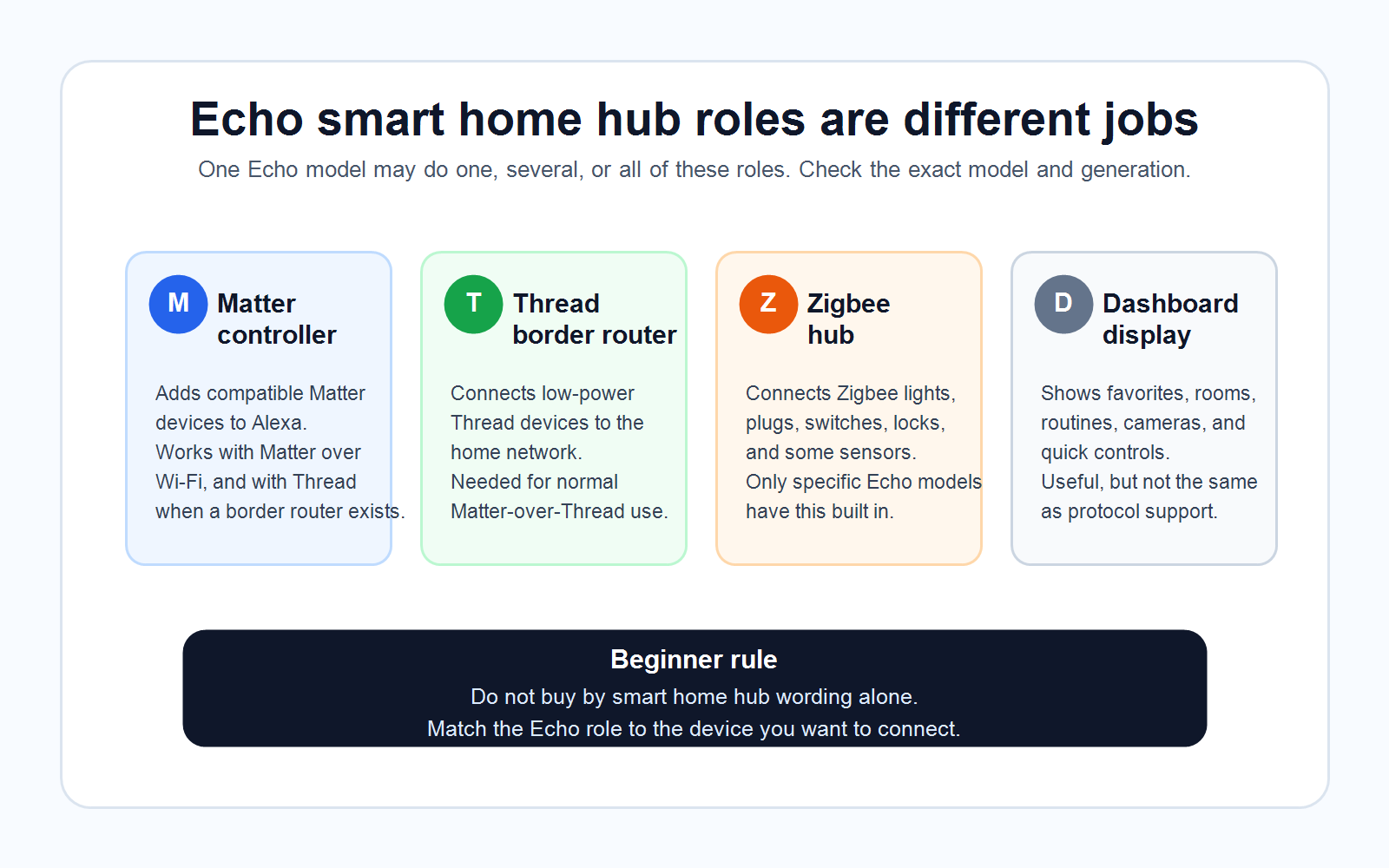
Matter controller vs Thread border router vs Zigbee hub
A Matter controller is the platform brain for Matter devices. In this article, that means Alexa can add and control supported Matter devices using a Matter-enabled Echo or supported eero device. Matter can run over Wi-Fi, Ethernet, or Thread.
A Thread border router is the bridge between low-power Thread devices and your normal home network. If a product says “Matter over Thread,” it needs more than just a Matter controller. It needs Thread border router support somewhere in the home.
A Zigbee hub is the coordinator for Zigbee accessories. If a product is Zigbee, it needs a Zigbee-capable Echo/eero, a brand bridge such as a lighting bridge, or a separate hub/platform that supports Zigbee.
The confusing part is that one physical product can do multiple jobs. Echo Hub can be a screen, a Matter controller, a Thread border router, and a Zigbee hub. Echo Dot can be a useful Alexa speaker and, in many generations, a Matter controller, but standard Echo Dot models are not listed by Amazon as Zigbee hubs or Thread border routers. Echo Dot Max is different because Amazon’s current official lists include it for Matter, Thread, and Zigbee.
Echo compatibility table
Use this table as a practical starting point, not a substitute for checking the exact product page and the Alexa app before buying.
| Echo device or family | Matter controller | Thread border router | Zigbee hub | Dashboard usefulness | Best use case | Buyer caution |
|---|---|---|---|---|---|---|
| Echo Hub | Yes | Yes | Yes | Excellent | Wall or counter smart home dashboard | Great for Alexa homes, but not a Z-Wave hub or full Home Assistant replacement. |
| Echo Show 21 | Yes | Yes | Yes | Excellent | Large wall display for shared spaces | Big screen can be overkill if you only need voice control. |
| Echo Show 15, 2nd Gen | Yes | Yes | Yes | Excellent | Wall display plus smart home controls | Check generation carefully; 1st Gen support is not the same. |
| Echo Show 11, 2025 | Yes | Yes | Yes | Strong | Mid-size Alexa+ display with hub roles | Verify account and regional feature support. |
| Echo Show 10, 3rd Gen | Yes | Yes | Yes | Strong | Countertop display with camera and control | Larger moving display may not fit every room. |
| Echo Show 8, 3rd Gen and 2025 release | Yes | Yes | Yes | Strong | Kitchen or living-room display with hub support | Earlier Show 8 models are Matter-capable but not all are Thread/Zigbee hubs. |
| Echo Show 5 | Yes | Not in official Thread list checked | Not in official Zigbee list checked | Basic | Bedside or desk display for simple Alexa control | Do not buy it as a Zigbee or Thread hub. |
| Echo Dot, 2nd Gen and newer | Yes | Not in official Thread list checked | Not in official Zigbee list checked | None | Low-cost Alexa voice control and Matter controller role | Standard Echo Dot is not the same as Echo Dot Max. |
| Echo Dot Max, 2025 | Yes | Yes | Yes | None | Voice-first room needing hub radios | No screen; use Echo Hub or Echo Show if you want a dashboard. |
| Echo, 4th Gen | Yes | Yes, Thread 1.1 | Yes | None | Voice-first hub for Zigbee and some Thread/Matter setups | Exact generation matters; older Echo models are different. |
| Echo Plus, 2nd Gen | Yes | Yes | Yes | None | Older Alexa speaker with hub radios | Older hardware; verify current support before relying on it. |
| Echo Studio, 1st Gen and newer | Yes | Yes | Yes | None | Audio-first room needing hub radios | Good for sound and hub roles, not for screen controls. |
| Echo Pop, Echo Flex, Echo Input, Echo Spot 2024 | Yes | Not in official Thread list checked | Not in official Zigbee list checked | Varies | Basic Alexa or Matter controller role | Do not assume they replace a hub for Zigbee or Thread devices. |
Which Echo devices support Matter?
According to Amazon’s Alexa Matter documentation, the Matter-enabled Echo/eero list is broad. It includes Echo (2nd Gen and newer), Echo Dot (2nd Gen and newer), Echo Dot Max, Echo Dot with Clock (2nd Gen and newer), Echo Flex, Echo Hub, Echo Input, Echo Plus (2nd Gen), Echo Pop, Echo Show 21, Echo Show 15 (1st Gen and newer), Echo Show 11, Echo Show 10 (3rd Gen), Echo Show 8 (1st Gen and newer, 2025 release), Echo Show 5 (1st Gen and newer), Echo Spot (2024 release), Echo Studio (1st Gen and newer, 2025 release), and selected eero models.
For buyers, the key point is that Matter support is the broadest of the three support lists. This is why someone may see a standard Echo Dot on a Matter support list and assume it is a full smart home hub. It is not that simple.
Matter controller support means the Echo can help Alexa add and control supported Matter devices. If the Matter device uses Wi-Fi, that may be all the hub-like hardware you need. If the Matter device uses Thread, you also need a Thread border router somewhere in the home.
Matter does not guarantee every advanced manufacturer feature appears in Alexa. Independent smart home coverage continues to document gaps between the Matter promise and real-world setup, feature parity, and platform implementation. Treat the Matter logo as a good sign, not a blank check.
Which Echo devices have Thread border router support?
Amazon’s official Thread documentation lists these Echo devices as Thread border routers: Echo (4th Gen), Echo Dot Max, Echo Hub, Echo Plus (2nd Gen), Echo Show 21, Echo Show 15 (2nd Gen), Echo Show 11, Echo Show 10 (3rd Gen), Echo Show 8 (3rd Gen and 2025 release), Echo Studio (1st Gen and newer, 2025 release), and selected eero models.
Thread matters most when you are buying Matter-over-Thread accessories, often small low-power devices such as sensors, buttons, plugs, locks, and similar devices. A Thread border router is the always-on device that links that low-power mesh to the rest of your network.
This is where a lot of buyers get tripped up. A product can be a Matter device and still need Thread. A home can have Wi-Fi and still not have Thread. A standard Echo Dot can be a Matter controller and still not be the Thread border router you need. Echo Dot Max is the exception in the current official list.
Which Echo devices support Zigbee?
Amazon’s official Zigbee documentation lists these Echo/eero devices as having built-in smart home hubs that connect and control Zigbee devices: Echo (4th Gen), Echo Dot Max, Echo Hub, Echo Plus (2nd Gen), Echo Show 21, Echo Show 15 (2nd Gen), Echo Show 11, Echo Show 10 (3rd Gen), Echo Show 8 (3rd Gen and 2025 release), Echo Studio (1st Gen and newer, 2025 release), and selected eero models.
Zigbee is common in lights, plugs, outlets, in-wall switches, locks, buttons, and sensors. If your accessory is Zigbee, you need one of the compatible Echo/eero devices above, a brand bridge, or another Zigbee hub.
Do not assume “Works with Alexa” means “connects directly to my Echo Dot.” Many Zigbee devices work with Alexa through another bridge or hub. That setup can still be perfectly fine. It just means the Echo is the voice/control layer, not necessarily the radio hub.
Also be careful with Echo Show generations. Amazon’s current Matter list includes Echo Show 15 1st Gen and newer for Matter, but the Thread and Zigbee lists specify Echo Show 15 2nd Gen. That is exactly why generation matters.
Echo Hub vs Echo Show vs Echo speaker
Echo Hub
Echo Hub is the most dashboard-focused option. Amazon describes it as an Alexa-enabled smart home control panel with an 8-inch touch display and a customizable smart home dashboard. It is designed to organize device controls, rooms, camera feeds, routines, and smart home favorites in one visible place.
Echo Show
Echo Show is broader. A newer Echo Show can be a smart display, video device, kitchen screen, family calendar, entertainment display, camera viewer, and smart home controller. Echo Show 15 2nd Gen and Echo Show 21 are especially dashboard-friendly because of their larger screens.
Echo speaker
Echo speakers are best when you want voice-first control. Echo Dot Max, Echo Studio, and Echo 4th Gen are the voice-first options in the official Thread/Zigbee lists. They make sense when you do not need a screen, but you do want Alexa plus hub radios in a room.
Basic Alexa device
Keep a basic Echo Dot, Echo Pop, or Echo Show 5 if all you need is simple Alexa control and Matter controller support. Do not buy those models as Zigbee or Thread hubs unless Amazon’s current support list changes.
Does Echo Dot work as a hub?
This is one of the most important buyer questions because Echo Dot is so common.
A standard Echo Dot can work as an Alexa controller for many smart home devices. Amazon’s Matter documentation also lists Echo Dot (2nd Gen and newer) as Matter-enabled. So yes, a standard Echo Dot can do some hub-like work for Alexa and Matter.
But a standard Echo Dot is not the same thing as a Zigbee hub or Thread border router. Amazon’s current official Thread and Zigbee lists do not include standard Echo Dot models. They do include Echo Dot Max.
- Echo Dot can be enough for Alexa voice control.
- Echo Dot can be enough for many Wi-Fi devices and supported Matter setups.
- Echo Dot is not enough if the accessory needs a Zigbee hub.
- Echo Dot is not enough by itself if the accessory is Matter over Thread and there is no Thread border router elsewhere in the home.
- Echo Dot Max is different because Amazon’s current official lists include it for Matter, Thread, and Zigbee.
When an Echo hub is enough
An Echo hub is often enough when you are building a simple Alexa-first home around lights, plugs, switches, locks, sensors, and dashboards that are supported by Alexa and the protocols in your exact Echo model.
For example, Echo Hub can make sense if you want a visible control panel for a household that already uses Alexa. Newer Echo Show models can make sense if you want smart home controls plus a kitchen screen, family calendar, recipes, reminders, video, and compatible camera views. Echo Dot Max, Echo Studio, or Echo 4th Gen can make sense if you want voice-first control and verified Zigbee/Thread/Matter roles without adding a display.
The best Echo-only homes tend to have three traits: they are Alexa-first, they use supported device categories, and they do not need deep custom automations.
When you still need a separate hub or bridge
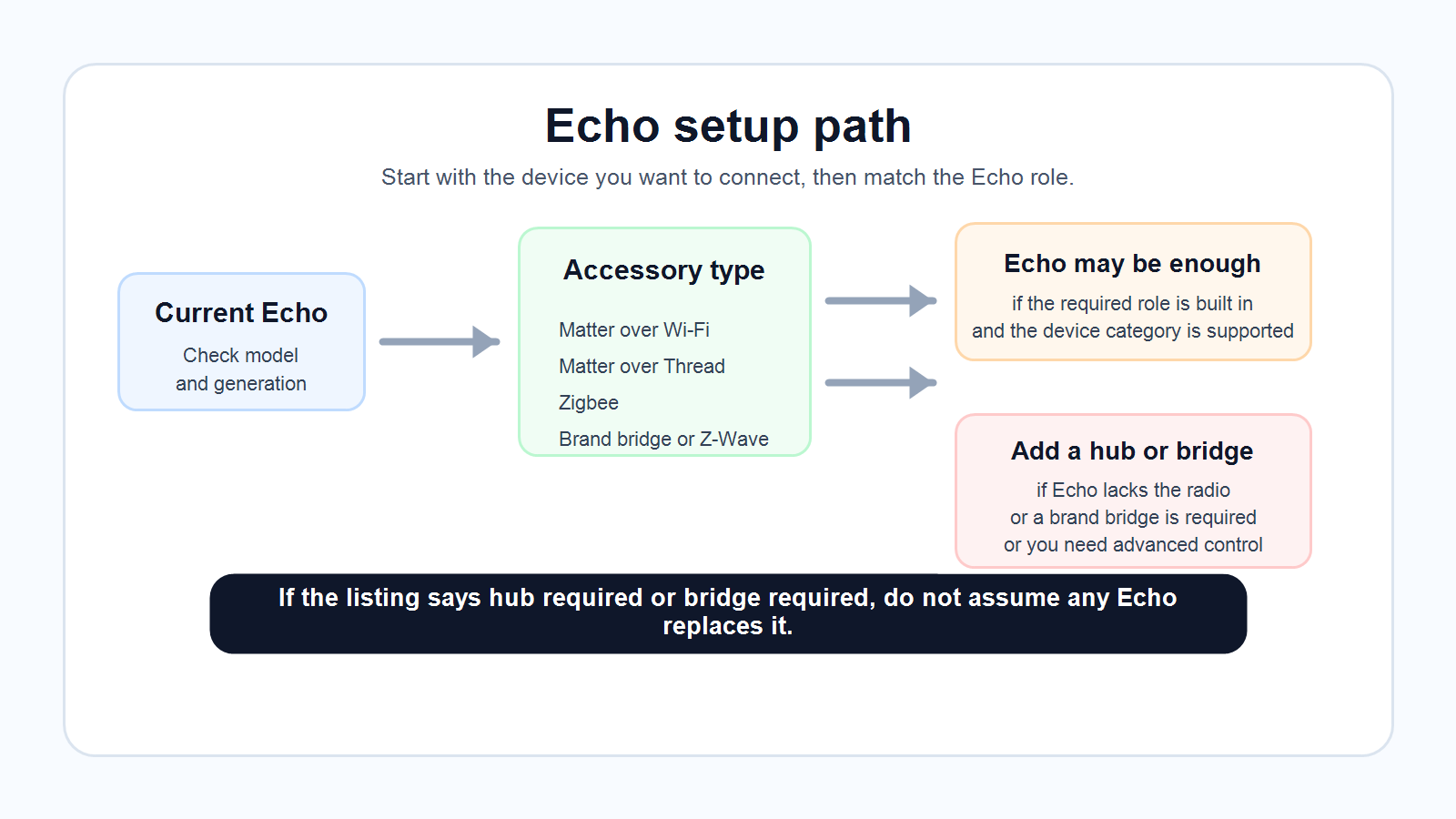
You may still need SmartThings, Hubitat, Home Assistant, a brand bridge, or another hub when the Echo does not support the device or control style you need.
- Z-Wave: Echo devices do not act as Z-Wave hubs. You will need a Z-Wave-capable hub or controller.
- Brand bridges: Some lighting, security, lock, camera, or sensor systems expose only basic controls to Alexa while keeping advanced features in the brand app or bridge.
- Advanced automation: SmartThings, Hubitat, or Home Assistant may fit better if you want more advanced local automation logic, deeper dashboards, wider device support, or complex cross-platform rules.
- Non-Alexa homes: If you are mainly Apple Home, Google Home, SmartThings, or Home Assistant, an Echo can still be a voice assistant, but it may not be the central hub.
Also consider reliability. Matter and Thread are improving, but independent coverage still shows real-world setup and troubleshooting friction, especially around Matter-over-Thread devices and multiple border routers. A technical household may prefer a platform with deeper diagnostics. A beginner household may prefer fewer moving parts.
What to check before buying an Echo for smart home control
Before buying an Echo because it says “hub,” check four things.
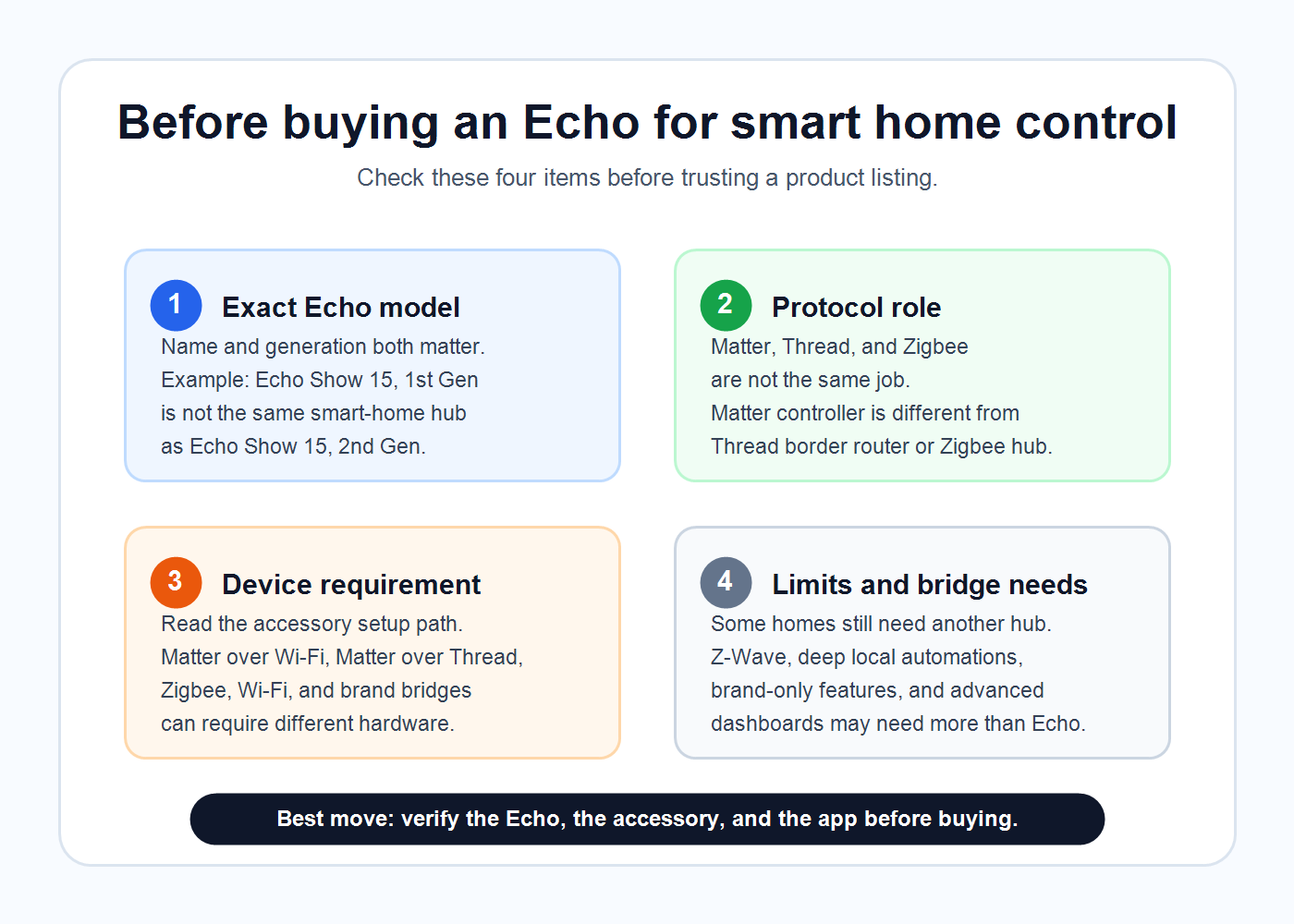
- Exact model and generation: “Echo Show 15” is not specific enough. You need to know whether it is 1st Gen or 2nd Gen.
- Device connection type: Is it Wi-Fi, Matter over Wi-Fi, Matter over Thread, Zigbee, Bluetooth, Sidewalk, Z-Wave, or a brand bridge system?
- Echo role support: Matter controller support is broad. Thread border router support and Zigbee hub support are narrower.
- App and feature path: Some devices still need a manufacturer app for setup, firmware updates, advanced features, account settings, or subscriptions.
Best Echo upgrade paths for common homes
Simple voice-control home
If you already have a standard Echo Dot and only use Alexa for voice commands, you probably do not need to upgrade. Clean up device names, rooms, and routines first.
Matter-over-Wi-Fi devices
If you want to add Matter-over-Wi-Fi plugs, bulbs, or switches, many Matter-enabled Echo devices may be enough. Check the device category and confirm it does not require Thread.
Matter-over-Thread devices
If you want to add Thread sensors, locks, plugs, or buttons, choose an Echo or eero device from Amazon’s Thread border router list.
Zigbee accessories
If you want to add Zigbee bulbs, plugs, switches, or sensors without a separate Zigbee hub, choose a model from Amazon’s Zigbee list.
Family dashboard
If you want a family dashboard, pick Echo Hub or a newer Echo Show. Echo Hub is more focused. Echo Show is more multipurpose.
Advanced automations
If you want advanced automations, local-first control, Z-Wave, or a serious hobbyist dashboard, keep Echo for voice and consider a dedicated hub as the automation platform.
FAQ
Which Echo devices support Matter?
Amazon’s official Matter list is broad. It includes Echo (2nd Gen and newer), Echo Dot (2nd Gen and newer), Echo Dot Max, Echo Hub, Echo Pop, Echo Show 21, Echo Show 15 (1st Gen and newer), Echo Show 11, Echo Show 10 (3rd Gen), Echo Show 8 (1st Gen and newer, 2025 release), Echo Show 5 (1st Gen and newer), Echo Spot (2024 release), Echo Studio (1st Gen and newer, 2025 release), and selected eero models.
Which Echo devices have Thread border router support?
Amazon’s Thread list includes Echo (4th Gen), Echo Dot Max, Echo Hub, Echo Plus (2nd Gen), Echo Show 21, Echo Show 15 (2nd Gen), Echo Show 11, Echo Show 10 (3rd Gen), Echo Show 8 (3rd Gen and 2025 release), Echo Studio (1st Gen and newer, 2025 release), and selected eero models.
Which Echo devices support Zigbee?
Amazon’s Zigbee list includes Echo (4th Gen), Echo Dot Max, Echo Hub, Echo Plus (2nd Gen), Echo Show 21, Echo Show 15 (2nd Gen), Echo Show 11, Echo Show 10 (3rd Gen), Echo Show 8 (3rd Gen and 2025 release), Echo Studio (1st Gen and newer, 2025 release), and selected eero models.
Does Echo Dot support Matter?
Yes. Amazon’s official Matter list includes Echo Dot (2nd Gen and newer). But standard Echo Dot models are not listed as Thread border routers or Zigbee hubs in the official Thread and Zigbee lists checked for this article.
Does Echo Dot Max have Zigbee and Thread?
Yes. Amazon’s current official Matter, Thread, and Zigbee lists include Echo Dot Max (2025 release). It is a voice-first option, not a dashboard.
Does Echo Show work as a smart home hub?
Some Echo Show models do, but not all in the same way. Echo Show 21, Echo Show 15 (2nd Gen), Echo Show 11, Echo Show 10 (3rd Gen), and Echo Show 8 (3rd Gen and 2025 release) appear in Amazon’s current Thread and Zigbee lists. Many Echo Show models appear in the Matter list. Check exact generation.
Does Echo Hub replace a separate hub?
Sometimes. Echo Hub can replace a separate hub for many Alexa-compatible Matter, Thread, Zigbee, Bluetooth, Sidewalk, and Wi-Fi setups. It does not replace Z-Wave, every brand bridge, every advanced manufacturer feature, or a full local automation platform.
Do I still need SmartThings, Hubitat, or Home Assistant?
You might. Use a dedicated hub or platform if you need Z-Wave, advanced local automations, deep dashboards, more diagnostics, complex multi-platform rules, or device support beyond Alexa’s current capabilities.
Related AIHA guides
For protocol basics, read Matter vs Thread vs Zigbee for Smart Homes. For the AI assistant side of the Alexa ecosystem, read What Is Alexa+?. For broader hub decisions, use Smart Home Hubs and Alexa Control.
If you are still planning your first useful automations, start with Best AI Home Automation Ideas for Beginners, then build practical safety use cases such as AI Home Security and Smart Leak Detection.
Sources
Official Amazon/Alexa sources used for device support claims: Amazon Alexa Matter support documentation, Amazon Alexa Thread support documentation, Amazon Alexa Zigbee support documentation, Amazon Echo Hub feature article, Amazon Echo Show 21 / Echo Show 15 article, Amazon new Echo devices built for Alexa+ article, Amazon Echo buying guide, and Amazon eero Wi-Fi tips.
Independent sources used for real-world cautions: The Verge on Matter implementation gaps, The Verge on Thread border router setup, The Verge on Thread diagnostics, The Guardian Echo Hub review, and WIRED Echo Hub review.
Final recommendation
Do not buy an Echo device just because the listing says “smart home hub.” Buy based on the hub job you actually need.
If you need a shared dashboard, start with Echo Hub or a newer Echo Show. If you need a voice-first hub with Matter, Thread, and Zigbee, check Echo Dot Max, Echo Studio, or Echo 4th Gen. If you only need Alexa voice control and Matter controller support, your current Echo Dot may already be enough. If you need Z-Wave, advanced local automations, or brand-specific features, keep Echo as the voice layer and use a dedicated hub or bridge underneath.
Next: check your exact Echo model and the connection type of the next device you plan to buy.